
2027 Guide: Comparison of Top Learning Management Systems and E-Learning Software

Comparing learning management systems can feel overwhelming. G2 tracks 398 LMS products and more than 13,000 user reviews. Analysts valued the market at $28.6 billion in 2025 and expect $34.1 billion in 2026, on pace for $123.8 billion by 2033.
This guide cuts through the noise with a ranked list of 12 platforms built for creators, solo instructors, and small-to-midsize teams that need to launch training fast. We rate each tool on ease of rollout, pricing clarity, built-in authoring, and the modern learner experience so you can jump straight to demos.
What counts as an LMS in this comparison?
We set clear ground rules so you can compare real learning management systems, not video hosts or cobbled-together plugins.
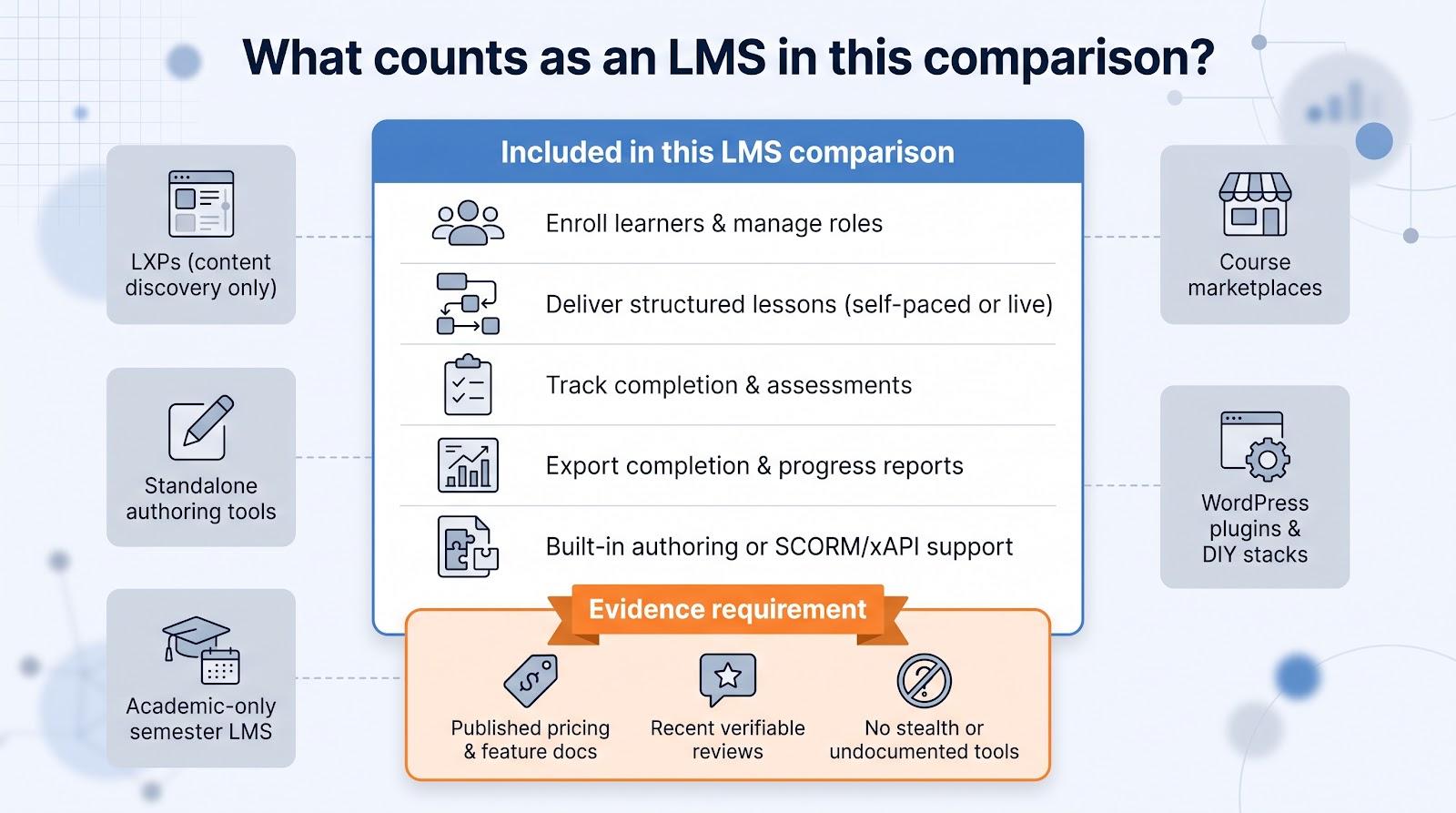
Minimum capabilities
An LMS in this guide must:
- Enroll learners and manage roles
- Deliver structured lessons (self-paced or live)
- Track completion and assessment data to the module level
- Export reports that show who finished what and when
- Provide built-in authoring, or accept industry packages such as SCORM 1.2/2004 or xAPI
What we excluded
- Learning experience platforms (LXPs) that focus on content discovery rather than assignment
- Stand-alone authoring tools without learner management
- Marketplaces that only sell video courses
- WordPress plugins or other DIY stacks that need heavy technical lift
- Academic systems built solely around semester grading cycles
Evidence requirement
Every shortlisted platform publishes current pricing and feature documentation, or supplies enough third-party review data to confirm those details. This rule filters out stealth startups and products with no release notes since 2023.
With the field defined, the next section explains how we scored each contender.
How we ranked the platforms
We weighted each criterion around the questions readers ask most: How fast can we launch? What will it cost? We then scored every platform on a 1–5 scale.
|
Criterion |
Weight |
|---|---|
|
Ease of launch and day-to-day administration |
20 percent |
|
Pricing clarity and overall value |
20 percent |
|
Built-in authoring and content flexibility |
20 percent |
|
Learner engagement and mobile experience |
15 percent |
|
Analytics, integrations, and open standards |
15 percent |
|
Scalability, customer support, and security |
10 percent |
How the math works
Weighted score = Σ (category score ÷ 5 × weight). A platform that earns 4 / 5 for Ease adds 16 points (4 ÷ 5 × 20).
We pulled ratings from sources you can verify: current vendor documentation, thousands of recent G2 and Capterra reviews, and practitioner forums that reveal day-to-day friction. Lab tests and months-long pilots weren’t in scope; the goal is to help you build a tight, data-backed shortlist.
Why product trials and demos still matter
Capterra’s 2026 Software Buying Trends survey found that 72 percent of satisfied buyers ran a product trial, versus 51 percent of regretful buyers. Use this guide to pick your shortlist, then pressure-test each one with the scenario script in the demo section.
Now that you know the scoring logic, the next table shows which platforms rose to the top.
LMS comparison table at a glance
Need the TL;DR? The grid below lists published rates (unless noted) as of September 3, 2026. Use it to spot front-runners, rule out poor fits, and head straight to demos.
|
Rank |
Platform |
Best for |
Starting price* |
Quick “skip if…” flag |
|---|---|---|---|---|
|
1 |
GoSkills |
Fast start for small teams |
Free; $9.71 per learner/month (annual) |
you require enterprise-grade BI on day one |
|
2 |
LearnWorlds |
Selling branded courses |
$24/month + $5 per enrollment |
you refuse any per-enrollment fees |
|
3 |
360Learning |
Collaborative, SME-led learning |
$8 per user/month (Team plan) |
you can’t commit to deactivating inactive seats |
|
4 |
TalentLMS |
General-purpose SMB training |
Free for 5 users; $119/month for 40 users |
you rely on bundled content libraries |
|
5 |
iSpring LMS |
PowerPoint-heavy course creation |
$4.46 per active user/month (300-user tier) |
your authors work only on macOS |
|
6 |
Continu |
Modern mid-market enablement |
Quote + $5k–$10k implementation fee |
you must launch inside 30 days |
|
7 |
Docebo |
Complex enterprise & extended audiences |
Quote (active-user model) |
your learner count is < 250 |
|
8 |
CYPHER Learning |
AI-native operations |
Quote (no public list) |
you insist on fully published prices |
|
9 |
Absorb LMS |
Polished enterprise UX |
Quote (module-based) |
you plan to sell consumer courses |
|
10 |
LearnUpon |
Multi-portal customer education |
Quote (active-user model) |
authoring depth needs to match desktop tools |
|
11 |
Moodle Workplace |
Partner-customized control |
Partner quote |
you want pure open-source licensing |
|
12 |
Canvas LMS |
Formal education institutions |
Institutional quote |
you need a rapid SMB rollout |
*Quote-based platforms usually price by monthly active users, feature modules, or both. Request ranges during discovery to build a true cost model.
Treat this table as a compass, not a contract. The next sections unpack strengths, limits, and pricing models so you can choose the right platforms for your shortlist.
1. GoSkills: best fast-start LMS for small teams
Need to launch onboarding this week? Choose GoSkills if you want rapid rollout, clear per-learner pricing, and in-house course creation. Built-in block authoring and the Genie AI assistant turn a PowerPoint or outline into a micro-course in minutes, while standards support (SCORM 1.2/2004, xAPI, AICC, cmi5) keeps legacy content intact.
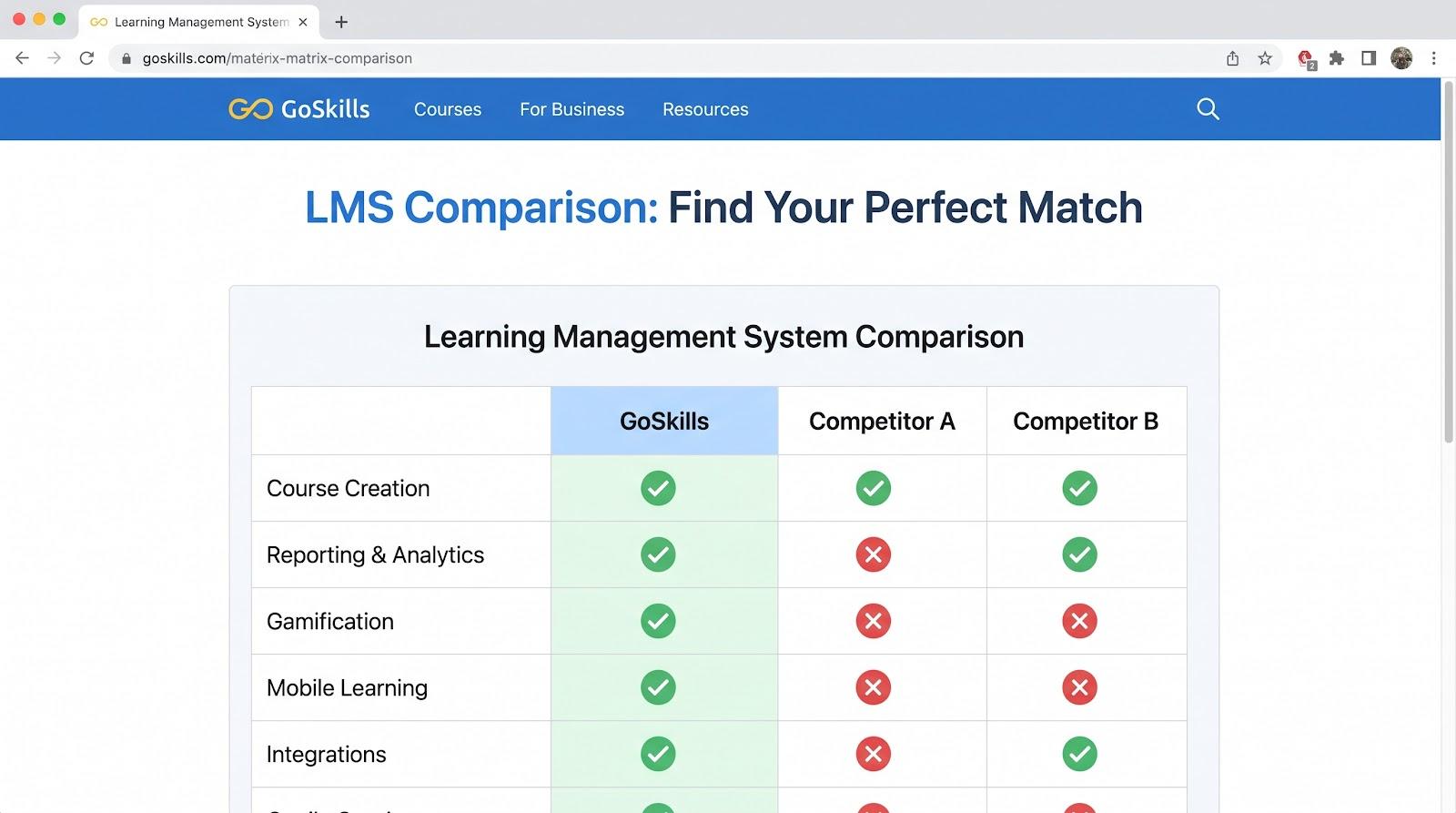
GoSkills LMS product interface screenshot for small teams
Pricing and plans
- Free Basic: unlimited time for small trials
- LMS Pro: $9.71 per learner per month when billed annually, with no seat minimums and self-service checkout
- Platinum: $15.28 per learner for all courses plus LMS features
The catalog lists hundreds of business and soft-skills courses (May 2026), but confirm which titles are included on each plan during your demo.
Why it scored well
GoSkills earned 5/5 for Ease and Pricing, 4.5/5 for Authoring and Engagement, and 3.5/5 for Data/Standards and Scale, for a total 89 / 100 under our weighting.
Mind the gaps
Enterprise features such as sandbox environments, advanced BI dashboards, and multi-domain management are still on the roadmap, so validate those needs before signing.
Choose GoSkills if you want rapid rollout, clear per-learner pricing, and in-house course creation. Skip it if you need deep analytics across thousands of learners or complex HRIS orchestration on day one.
2. LearnWorlds: best for instructors selling branded courses
When course commerce matters as much as pedagogy, LearnWorlds pairs a drag-and-drop storefront with a full LMS. You get a white-label portal, built-in payments for subscriptions and bundles, and upsell widgets that turn visitors into buyers. Interactive video, graded quizzes, certificates, and community spaces keep learners interested long after checkout.
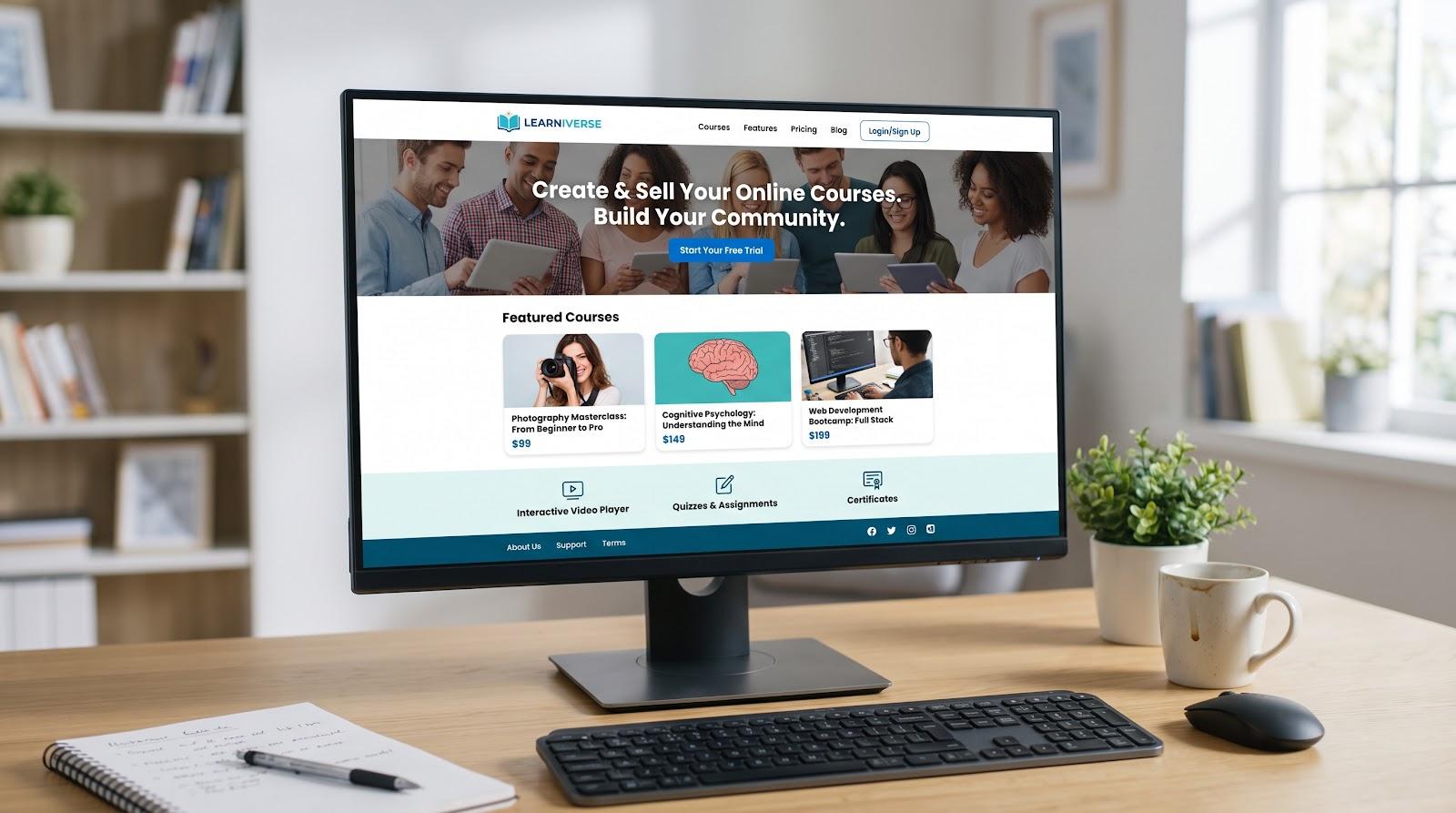
LearnWorlds LMS storefront and course catalog screenshot
AI assist across the workflow
The platform drafts lesson outlines, quiz banks, images, email copy, captions, and subtitles; you refine and publish, all within the same editor.
Pricing snapshot (billed annually)
- Starter: $24/month + $5 per paid enrollment, capped at 1,000 active learners and one admin
- Pro Trainer: $79/month, 0 percent transaction fees, and branded, mobile-responsive pages
- Learning Center: $249/month, adds API access, full SCORM, and advanced analytics
Factor the $5 enrollment fee into your forecast: selling 50 courses a month adds $250 to Starter, often making Pro Trainer the better value.
Choose LearnWorlds if you need storefront polish, branded user experience, and AI that speeds both course creation and marketing. Skip it if per-enrollment fees are a deal-breaker or if complex HR integrations top your list on day one.
3. 360Learning: best for collaborative, SME-led learning
When your internal experts need to share know-how fast, 360Learning turns them into co-authors. Its Google Docs-style editor, threaded comments, and emoji reactions keep updates social and near real time, so courses improve with each cohort.
Pricing and user model
- Team plan: $8 per active user per month (self-service, up to 100 users)
- A user becomes active as soon as the account is created, even before first login.
- Optional add-ons (Coaching, Live Learning, Globalization) cost an extra $2 per user each.
Feature highlights
AI drafts courses and personalizes recommendations. SCORM and xAPI imports meet compliance needs, while native HRIS and HCM connectors become available on the Enterprise tier.
Choose 360Learning if peer-to-peer knowledge sharing drives your learning culture. Skip it if admins can’t commit to regular user housekeeping or if you need deep compliance reporting on day one.
4. TalentLMS: best general-purpose LMS for SMBs
TalentLMS keeps the learning curve short: sign up, choose a subdomain, and you’re already building courses. The forever-free plan supports 5 users and 10 courses, giving you room to pilot without a credit card. When you’re ready, the Core plan costs $119 per month for up to 40 registered users on annual billing.
Under the hood you get features that often cost more elsewhere: multi-audience branches, learning paths, badges and points, plus automations that trigger emails or enrollments. Standards support includes SCORM 1.2/2004, xAPI, cmi5, and LTI 1.3, so legacy packages import cleanly.
Watch-outs
- TalentLibrary: a catalog of ready-made courses sold as an add-on; fees vary by user count
- Businesses focused on selling consumer courses may outgrow TalentLMS commerce tools and lean toward a storefront-first platform such as LearnWorlds.
Choose TalentLMS if you want a budget-friendly LMS that scales from a free sandbox to mid-market tiers. Skip it if your strategy depends on bundled course libraries or advanced storefront features out of the box.
5. iSpring LMS: best for rapid PowerPoint-based course production
If your team already owns a library of PowerPoint decks, iSpring turns them into full e-learning modules without rebuilding slides in a browser. The iSpring Suite plug-in converts presentations into SCORM 1.2/2004, xAPI, or cmi5 files and adds quizzes, role-play simulations, and voice-overs, all inside PowerPoint.
AI accelerators
Built-in prompts generate images, translate narration into more than 70 languages, and draft question banks; you edit before publishing.
Pricing snapshot (annual)
- 300-user tier: $4.46 per monthly active user
- Larger tiers drop to $3.97 at 500 users and $3.58 at 1,000 users.
Billing counts only users who log in during the month, a win for periodic training cycles.
Desktop authoring requires Windows and Microsoft PowerPoint; Mac-only teams will need a virtual machine or a different tool.
Choose iSpring if most content starts as slides and you need precise SCORM output fast. Skip it if your authors work on macOS, or if multi-tenant portals and e-commerce top your wish list.
6. Continu: best modern mid-market enablement platform
When you’ve outgrown check-the-box compliance but don’t need a Fortune 500 suite, Continu bridges the gap. The interface feels like a modern web app, and learning journeys weave live workshops, on-demand courses, and assessments together. Automations push nudges into Slack and Microsoft Teams so busy sales, support, and partner teams stay on track.
Transparent, MAU-based pricing
Continu prices by monthly active user (MAU) bands and lists a one-time implementation fee of $5,000 to $10,000. A user counts as active when they log in or interact with the platform during the month. Rollout typically takes about 60 days, faster than many enterprise-scale LMS projects.
Tiers and key capabilities
AI authoring, external customer academies, and e-commerce become available on the Professional tier; confirm your needs before signing. SCORM 1.2/2004 playback, native HRIS and CRM integrations, and prompt-based analytics dashboards come standard.
Choose Continu if you need an enablement hub that scales to customers and partners without added complexity. Skip it if you’re piloting with fewer than ten learners or require a two-week launch window.
7. Docebo: best for sophisticated enterprise and extended-enterprise learning
When you train employees, customers, and channel partners under one roof, Docebo brings everything together. Multi-audience portals, granular role permissions, and branded mobile apps are native, so learning teams manage one platform, not a tangle of point solutions.
AI helps at scale with course drafts, real-time translation, a chat-style tutor, and role-play assessments that score soft-skills practice.
Pricing signals
Docebo prices by active users, not registered accounts; tiers start at 250 active learners and grow with usage. Core platform packs (Elevate and Enterprise) split out advanced analytics, e-commerce, gamification, and Extended Enterprise as add-ons. During procurement, model AI credit usage and mobile-app charges, which appear on the Usage dashboard.
Implementation scope
Deployments often include SSO, HRIS, and data-warehouse integrations and run 60–120 days for organizations above 250 learners, based on Docebo service descriptions.
Choose Docebo if you need global reach, deep analytics, and a clear path to AI-driven operations. Skip it if you’re training only a few dozen users or want flat-fee pricing without add-ons.
8. CYPHER Learning: best AI-native operations
CYPHER calls itself an AI-first LMS: upload source files, choose a course “recipe,” and the platform builds lessons, quizzes, images, and certificates in one flow. On the back end, an AI agent maps skills, suggests next modules, and flags knowledge gaps, so you won’t need to build paths by hand.
Pricing and AI credits
CYPHER now publishes scalable tiers that include 100 AI credits per user per year out of the box; larger bundles are available for high-volume creators. Pricing remains quote based, so request a range and confirm overage rates.
What to verify in your demo
- Live export of completion data
- SCORM/xAPI playback quality
- API calls into your HRIS or CRM
- AI governance switches (ability to disable generation, retention windows)
Choose CYPHER if you want AI handling both course creation and learner guidance from day one. Skip it if you need fully published seat pricing or prefer a vendor with a decade-plus enterprise track record.
9. Absorb LMS: best polished enterprise learner experience
Absorb starts with a learner-first interface: mobile-responsive dashboards, configurable themes, and automation that handles enrollments, prerequisites, and recurring certifications. Administrators can focus on strategy, not spreadsheet wrangling.
Modular architecture
- Absorb LMS (core)
- Analyze: advanced BI dashboards
- Create: desktop-grade authoring
- Engage: polls, leaderboards, social widgets
- Infuse: headless API delivery
Each module is licensed separately, so pin down day-one versus year-two needs during quoting.
Pricing model
Absorb publishes no list rate; quotes are based on active users plus selected modules. Ask whether AI-assisted authoring and analytics are bundled or sold à la carte, and confirm any mobile-app token or sandbox fees.
Choose Absorb if you want a consumer-grade learner interface with strong compliance features and feel comfortable budgeting for add-ons. Skip it if modular pricing strains your budget or storefront commerce is mandatory.
10. LearnUpon: best for customer, partner, and multi-portal training
LearnUpon lets you run separate portals, each with its own branding, catalog, and reports, under one admin login. Compliance for employees, enablement for customers, and certification for partners sit side by side without the cost of three platforms.
Why admins like it
Course cloning and group rules push updates across portals, so changes ripple out instantly. SCORM 1.2/2004, xAPI, surveys, and exams cover content formats, while built-in e-commerce turns your catalog into paid offerings.
Pricing signals
LearnUpon quotes by active users per portal plus optional add-ons such as the Salesforce connector. Tier minimums often start around 150–250 active users; ask for ranges and portal caps to avoid paying for seats you won’t use. Confirm whether built-in authoring matches your standards or if you’ll lean on tools like iSpring or Storyline.
Choose LearnUpon if you want one hub for employees, customers, and partners. Skip it if desktop-grade authoring or AI-assisted content creation tops your wish list.
11. Moodle Workplace: best for customization through an implementation partner
Moodle Workplace layers multi-tenant architecture, organizational hierarchies, and advanced reporting on top of the open-source Moodle core, but you license it through a Moodle Certified Partner who hosts, configures, and supports the environment.
Why the partner model matters
You can adapt workflows, branding, and integrations beyond most SaaS rivals, yet total cost, timeline, and support quality hinge on the partner’s statement of work. Ask for fixed estimates covering migration, SSO, sandbox access, and ongoing maintenance; partner quotes often start around $6–$12 per active user per month for midsize deployments, plus setup fees.
Standards and AI options
Workplace inherits SCORM 1.2/2004, xAPI, and LTI 1.3, and recent releases added optional AI plugins for content suggestions and automated question banks. Because the partner controls the stack, you can enable or disable these features to meet data-privacy or accessibility policies.
Choose Moodle Workplace if you need deep customization and are willing to work closely with an implementation specialist. Skip it if you want a ready-made, vendor-managed SLA or expect self-service setup in a day.
12. Canvas LMS: best for schools and universities
Canvas leads higher education because its course shells mirror semester schedules, SpeedGrader handles complex rubrics, and accessibility features (captions, ARIA labels, keyboard navigation) have passed audits at hundreds of U.S. institutions.
2026 tier update
Instructure now sells three bundles:
- Core: assignments, discussions, SpeedGrader
- Plus: adds advanced analytics and Studio interactive video
- Next: adds AI-assisted content creation and natural-language actions across more than 500 Canvas APIs
Pricing remains quote based and usually ties to full-time enrollments and support level; public RFPs show $12–$25 per FTE annually for Core at mid-sized U.S. colleges.
Why it ranks 12th here
Our scoring values price transparency and fast SMB rollout more than deep academic analytics, so Canvas lands last even with its higher-ed dominance.
Choose Canvas if you run credit-bearing programs that demand detailed grading, accreditation reports, and FERPA compliance. Skip it if you’re a small business that needs to train employees by Friday.
Which LMS fits your use case?
A high chart score means little if the platform doesn’t solve your problem. Match your context to the shortlists below, then run the demo script to confirm fit.
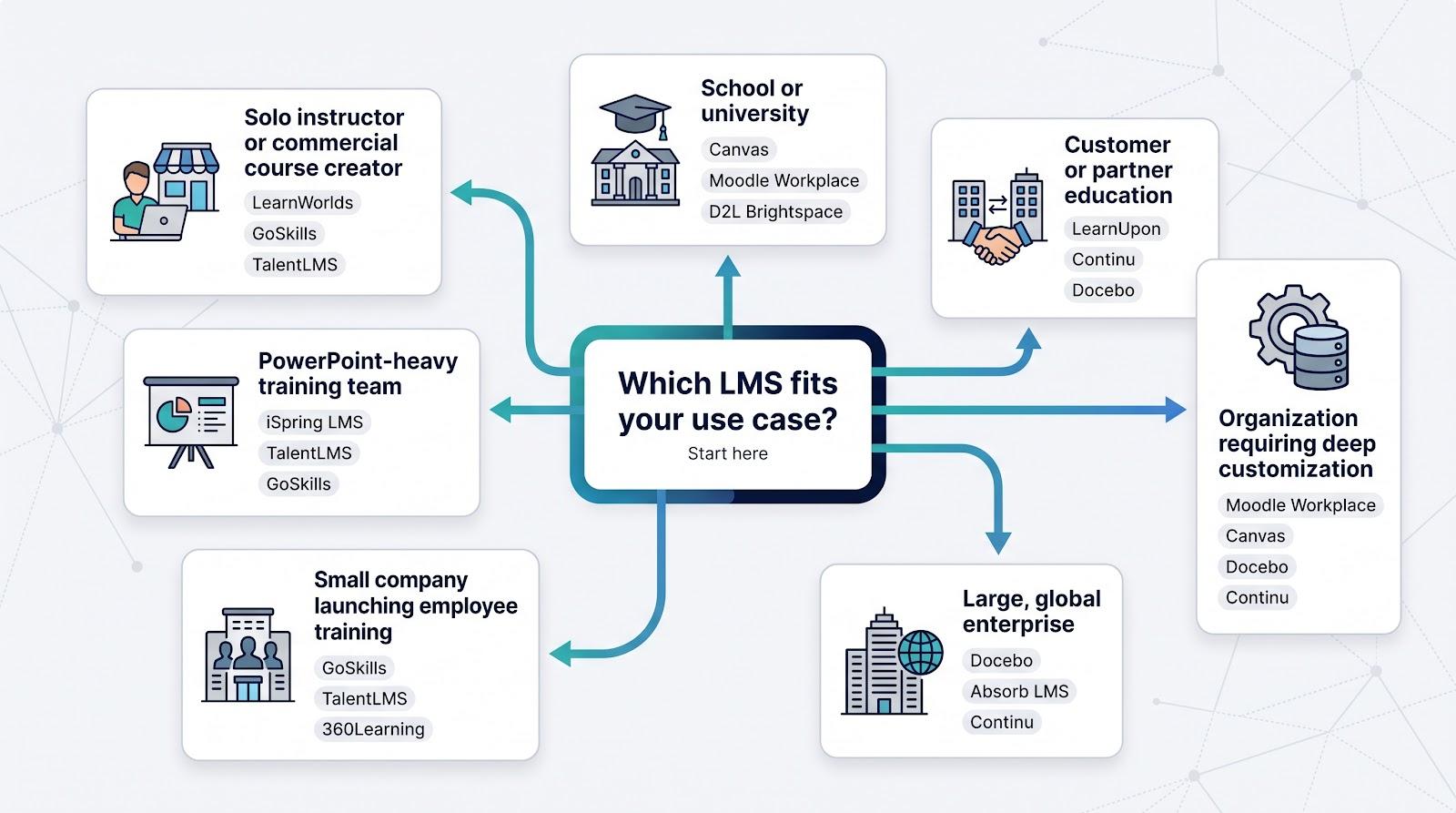
Solo instructor or commercial course creator
- LearnWorlds – storefront, site builder, and AI copy assistant in one package; transaction fees disappear on the Pro tier
- GoSkills – free Basic plan and business-skills library get internal teams live in hours
- TalentLMS – forever-free sandbox; upgrade only when enrollments justify the spend
Focus question: Do you need a shopping cart or the fastest path to internal onboarding?
Small company launching employee training
- GoSkills – pilot with ten learners for $0; Pro tier costs $9.71 per learner/month on annual billing
- TalentLMS – Core plan covers 40 users for $119/month; automation and branches manage growth
- 360Learning – collaborative authoring for SME-heavy cultures; remember to deactivate inactive users ($8 per account/month)
Pick the tool that fits your growth plan: GoSkills for instant lift-off, TalentLMS for balanced scalability, or 360Learning when peer knowledge is your secret sauce.
PowerPoint-heavy training team
- iSpring LMS – PowerPoint plug-in converts decks to SCORM/xAPI/cmi5 courses; $4.46 per active user at 300 seats
- TalentLMS – cloud import for slides plus branch management
- GoSkills – Genie AI breaks PPTs into mobile-ready micro-lessons in minutes
Customer or partner education
- LearnUpon – separate portals for employees, customers, and partners under one admin roof
- Continu – external academies plus Slack/Teams workflow automation
- Docebo – extended-enterprise modules and deep analytics; budget for add-ons and a longer rollout
Large, global enterprise
- Docebo – multi-audience architecture and AI personalization; expect a 3- to 6-month rollout
- Absorb – consumer-grade UI with compliance muscle; add Analyze or Create as needed
- Continu – modern UI, HIPAA-ready security, and a published $5,000 to $10,000 implementation fee
School or university
- Canvas – semester workflows, gradebook precision, and Plus/Next tiers for analytics and AI
- Moodle Workplace – partner-hosted customization on top of open-source DNA
- D2L Brightspace – competency-based learning and strong mobile accessibility (honorable mention)
Organization requiring deep customization
- Moodle Workplace – partner model lets you rework data schemas and branding at will
- Canvas – 500-plus APIs for campus IT teams that want to build on top
- Docebo or Continu – headless APIs and microservices for corporate stacks that need flexibility without self-hosting
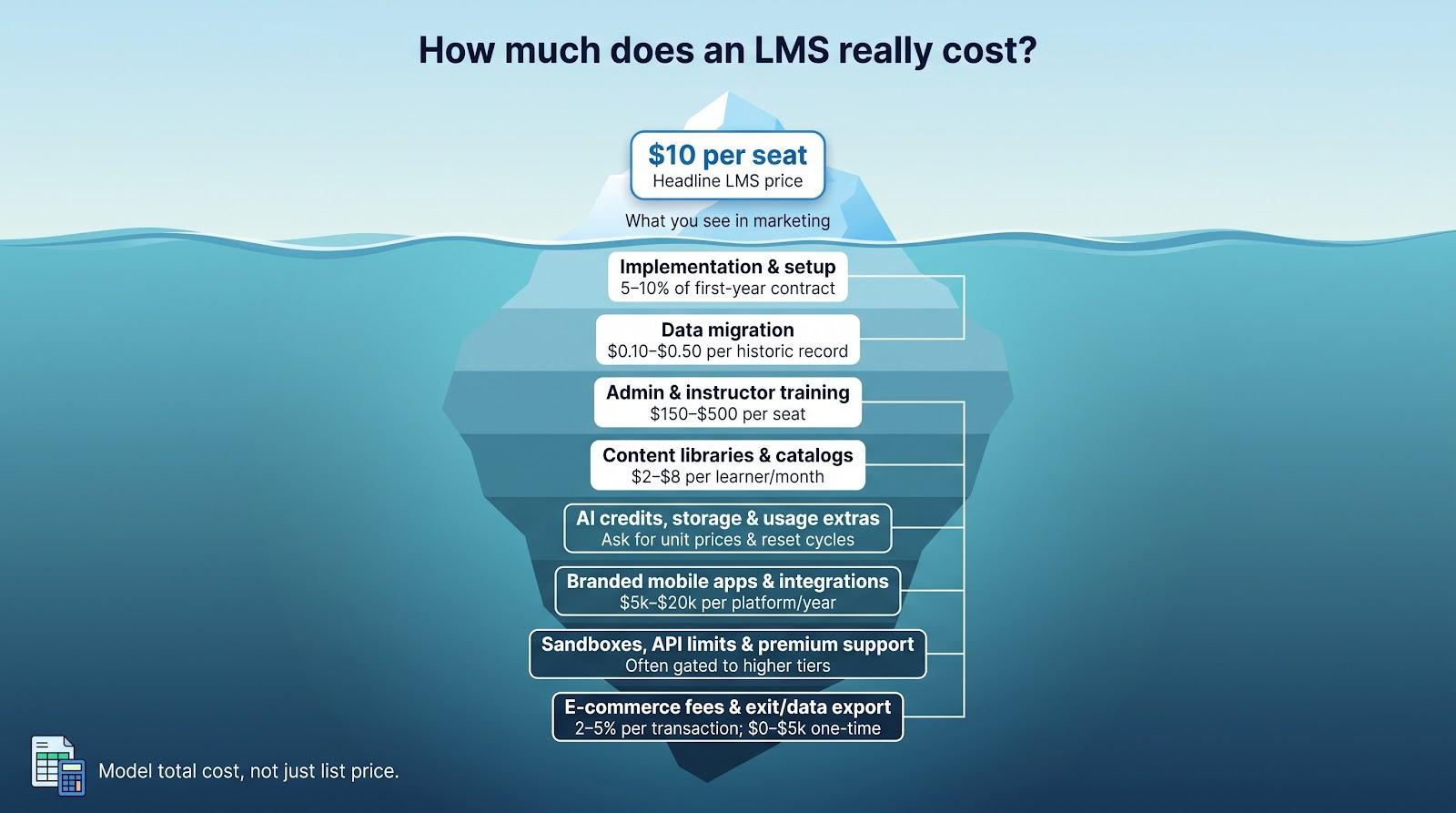
How much does an LMS really cost?
A “$10-per-seat” headline rarely matches the invoice. User definitions, add-ons, and services can double or even triple first-year spend. Learn the billing language so you can compare quotes apples to apples.
Pricing-model glossary
- Per registered user – every account is billable, active or not; best for stable, always-on academies
- Per active user – only logins within the billing cycle count; check whether admins are billed
- MAU bands – pay in blocks, e.g., 501–1,000 monthly active users; crossing a band pushes you to the next tier
- Concurrent user – meters simultaneous logins, useful for one-day compliance events
- Flat subscription – unlimited learners, but feature or storage caps may apply
- Usage extras – AI credits, API calls, video minutes, and emails often have overage fees; ask for unit prices
- Open source + services – software is free, yet hosting, updates, and support shift to your IT team or a partner
Hidden costs to pin down before you sign
|
Cost area |
Typical range* |
What to ask |
|---|---|---|
|
Implementation |
5–10 percent of first-year contract |
Which tasks are vendor owned vs. internal? |
|
Data migration |
$0.10–$0.50 per historic record |
Fixed bid or time and materials? |
|
Admin training |
$150–$500 per seat for live workshops |
Is online self-study enough? |
|
Content libraries |
$2–$8 per learner/month |
Does the license survive contract termination? |
|
AI credits & storage |
Varies by vendor |
What’s the reset cycle and overage rate? |
|
Branded mobile apps |
$5k–$20k per platform/year |
Are push-notification limits included? |
|
Sandboxes & API calls |
Often gated to higher tiers |
Daily or monthly call limits? |
|
Premium support |
20–30 percent contract uplift |
Does 24/7 phone or a dedicated CSM come standard? |
|
E-commerce fees |
2–5 percent per transaction |
Can you use your own gateway? |
|
Exit & data export |
$0–$5k one time |
Do you have a written clause for a full data dump? |
*Ranges compiled from public vendor documentation and 2026 RFP disclosures; verify current figures with each provider.
Add every line item to a simple spreadsheet. Only total ownership, not the marketing headline, tells you whether an LMS fits the budget.
LMS features that will matter most in 2027
Planning an LMS on today’s checklist alone is risky. AI credit models, data standards, and accessibility rules keep shifting. The features below already separate leaders from laggards; use them as a demo script and contract checklist.
- AI-assisted authoring – Winning tools generate full course drafts (lessons, quizzes, captions, and images) in one flow, while keeping humans in control with editable drafts, source-document grounding, and visible credit meters.
- Learner tutoring and recommendations – Chat-style tutors that answer from approved course content are becoming standard. Ask for logs, kill switches, and a way to keep model training limited to private data.
- Agentic administration – Natural-language actions (“Enroll new Sales hires, then email me completions every Friday”) already ship via public APIs or Microsoft Copilot integrations. Check how many tasks the agent automates today, not just on a roadmap.
- Content localization at scale – Look for autogenerated subtitles, AI voiceovers, and slide translations, with human approval queues and language-coverage dashboards.
- Interoperability and data portability – SCORM still matters, but xAPI and cmi5 drive modern analytics. Confirm the platform stores the full xAPI statement and can bulk-export results. LTI 1.3 remains essential for higher-ed stacks. APIs and webhooks should send raw data to your warehouse without throttling.
- Accessibility evidence – The U.S. Department of Justice’s 2026 interim rule keeps pressure on WCAG 2.1 AA compliance. Ask for a current VPAT/ACR, a keyboard-only walkthrough, and proof that AI-generated assessments meet the same standards.
- Multi-audience delivery – Training employees, customers, and partners from one platform is now a baseline requirement. Demand isolated branding, permissions, and reporting for each group.
- Business-impact analytics – Completion rates won’t justify budgets. Look for dashboards that tie learning to onboarding speed, sales readiness, or customer retention, and for open APIs that feed your BI stack.
If a vendor can’t show evidence for most of these areas in a live demo, odds are they won’t catch up by your next renewal.
LMS demo and procurement checklist
- Authoring test: import a real slide deck or PDF and generate a draft course.
- Enrollment rule: pull an HRIS segment or CSV, assign a path, and schedule a custom report.
- Accessibility pass-through: show keyboard-only navigation and the latest VPAT/ACR.
- AI governance: disable generation, view audit logs, and check credit usage.
- Mobile view: navigate the learner app and note white-label costs.
Track clicks and time for each task, and rate effort while the experience is fresh. After demos, confirm total first-year cost, renewal caps, minimum seats, and a clause stating that your data will not train vendor AI models.
LMS migration playbook (quick reference)
Follow these steps to move content and users without losing data:
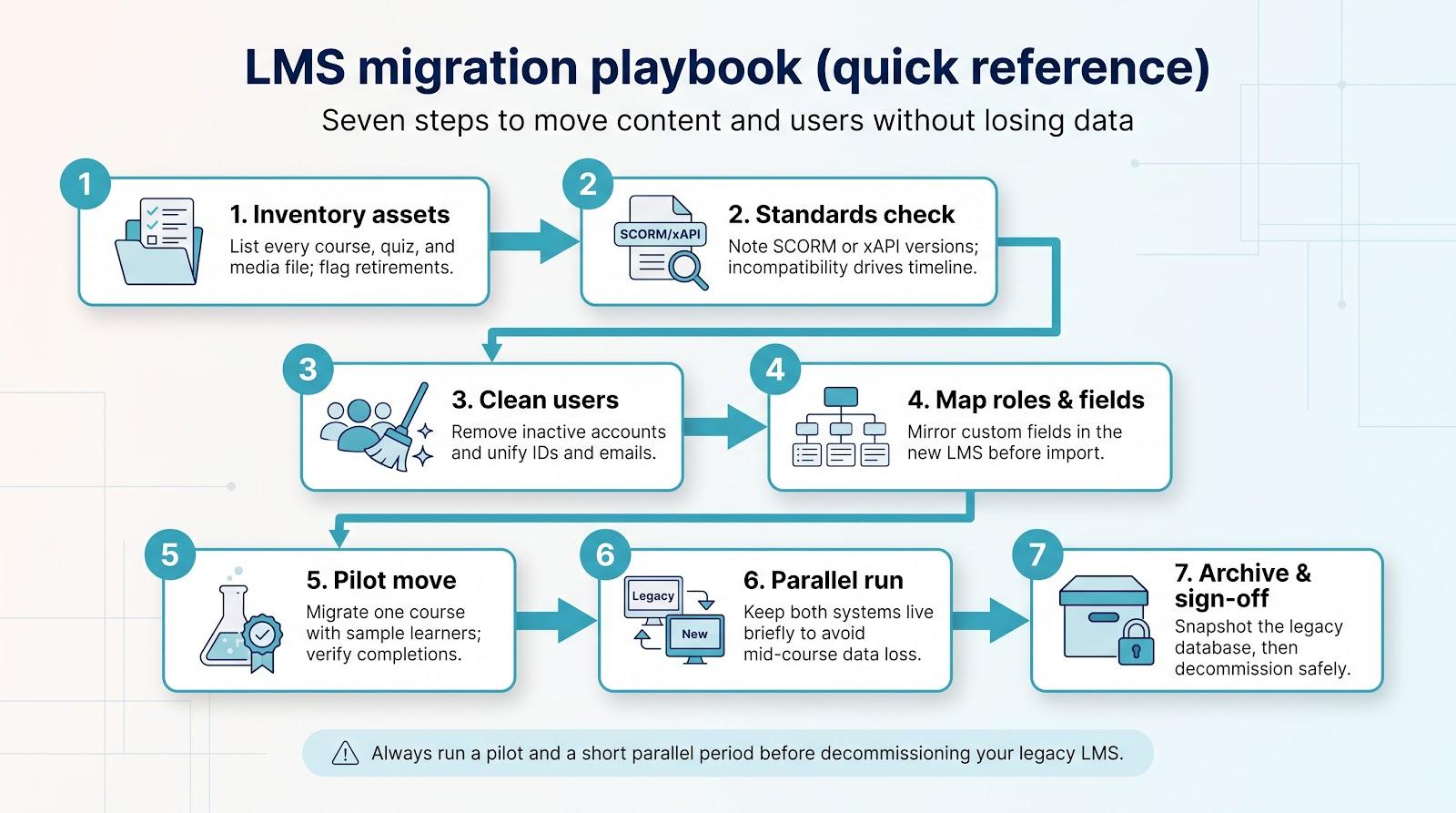
- Inventory assets: list every course, quiz, and media file; flag retirements.
- Standards check: note SCORM or xAPI versions; incompatibility drives timeline.
- Clean users: remove inactive accounts and unify IDs and emails.
- Map roles/fields: mirror custom fields in the new LMS before import.
- Pilot move: migrate one course with sample learners and verify completions.
- Parallel run: keep both systems live briefly to prevent mid-course data loss.
- Archive & sign-off: snapshot the legacy database, then decommission.
Conclusion
Add every cost line item to a spreadsheet, test real workflows in demos, and verify AI governance before you sign. A data-backed comparison and a clear exit plan, protects your training investment well beyond 2027.

Vaayu is a full-time blogger and content writer with a passion for digital marketing. With years of experience in the industry, he shares practical tips, insights, and strategies to help businesses and individuals grow online. When not writing, Vaayu enjoys exploring new marketing trends and testing the latest online tools.