

Not sure about whether to go with NeuronWriter or not? here’s a in-depth NeuronWriter review for you to make a reliable decision.
You’ve probably struggled with creating content that not only grabs attention but also ranks well on Google. Whether it’s for a blog, a website, or even social media, getting your words to shine can feel like an uphill battle.
That’s where tools like NeuronWriter come in. It’s a writing assistant that claims to help you write smarter by optimizing your content for both readers and search engines. But does it really work? And more importantly, is it worth your time and money?
In this review, I’ll share my honest experience with NeuronWriter, what I liked (and didn’t like), and whether I think it’s a good fit for someone trying to step up their content game. So, grab a coffee, and let’s dive in!
What is NeuronWriter?

NeuronWriter is an AI-powered, content writing and optimization tool for bloggers, marketers, and content teams that research, analyze, and SEO-optimize your content.
This tool analyzes top-performing pages on Google on the basis of your keywords and suggests you headings, terms, on-page SEO ideas that are essential for ranking.
Additionally, you get AI-writing capabilities that auto-generate article outlines, titles, headings, YouTube descriptions, complete articles, rephrase text, and more. It offers several features, such as:
Key Features of NeuronWriter
NeuronWriter offers numerous advanced features built to enhance the efficiency of content creation and SEO optimization. Let me point out the major components:
1. AI Writing Assistant
NeuronWriter applies modern language models, such as GPT-4 Turbo, GPT-3.5 Turbo, and text-davinci-003. These models empower neuron writers to craft high-quality, optimized content.
Moreover, this tool offers Natural Language Processing (NLP) recommendations, presenting relevant keyword terms and phrases based on SERP analysis to outrank your competitors.
2. SEO Content Optimization:
NeuronWriter first studies the top 30 pages ranking on Google for a target keyword. Then it analyzes their content structure, readability, content length, and keyword usage, and offers AI-powered suggestions that recommend titles, terms, headings, relevant queries, and word counts. Below are some optimizing features.
Terms:
NeuronWriter’s “Terms” features present ‘basic’ and ‘extended’ term suggestions. Including those individually will improve your content score, optimizing your content that is more likely to outcompete.
Headings:
Besides, its “Headings” option offers H1, H2, and H3 terms that help you optimize the headings.
Outline:
Under the “Outline” option on NeuronWriter, you get various heading suggestions powered by AI. These include headings of your competitors, headings with unused terms, and relevant questions.
3. Content Planning and Research
It utilizes a robust framework and streamlines the process of content research and planning. Instead of examining the competitors manually, you get the top-ranking page’s content analysis in a single page.
Once you enter your target keywords, it analyzes all the SEO metrics like content score, content length, external links, MOZ DA & PA insights, and helps prepare your content.
4. SERP Analysis
NeuronWriter conducts in-depth research of 30 top-ranking pages for a chosen keyword on the basis of content quality, keyword usage, meta description, headings, and total content length.
Then, it presents a full report of high-ranking pages. These data include their:
5. Content Editor
NeuronWriter presents an intuitive content editor that enables you to type content using all standard editing elements. These include text formatting options, paragraph alignment, undo/redo, adding multimedia, and more.
In addition, the tool offers several options for content optimization:
6. Integration with CMS like WordPress
NeuronWriter integrates with the WordPress CMS platform, optimizing your WordPress blog within the NeuronWriter’s editor interface.
As a user, you need to connect NeuronWriter to their WordPress using an API or plugin. Then NeuronWriter extracts all your content from the WordPress blog under “Domain-Level Project”. This enables editing the existing content and creating new posts.
How NeuronWriter Improves Content Creation?
NeuronWriter’s writing and optimization features enable you to optimize your content following all on-page SEO practices. Here is how it can improve your content creation process:
AI-Assisted Writing:
NeuronWriter leverages advanced AI models like GPT-4, Claude Sonnet 3.5, NLP, and machine learning algorithms. These AI-powered technologies assist bloggers, marketers, and SEOs to help create outlines, headings, and blog posts with just a click. Additionally, it generates full paragraphs on any specific topic through its AI-writing feature.
Let me show you how you can prepare and write your content:
Keyword-Optimization
I know you are well aware of the importance of EEAT (Experience, Expertise, Authoritativeness, and Trustworthiness) guidelines nowadays. Google prioritizes people-first content that showcases expertise and authority.
To comply with EEAT and other standard rules, you need NeuronWriter’s keyword optimization feature focused on improving semantic SEO that encompasses:
Now, this tool provides you with two lists of terms- ‘basic and extended” and their frequency to improve SEO content score. Besides, its “Competition” feature provides titles, headings, meta descriptions, URLs, and schemes of the top-ranking pages.
Including those relevant keywords, and implementing research data will make your content information-rich, making your content more likely to rank on Google.
This is how NeuronWriter can help you enhance your content quality and optimization.
How to Use NeuronWriter?
Based on my experience, there is a learning curve with NeuronWriter, though it takes some hours to master this tool. Here is a step-by-step process to use the tool.
1. Create a New Project:
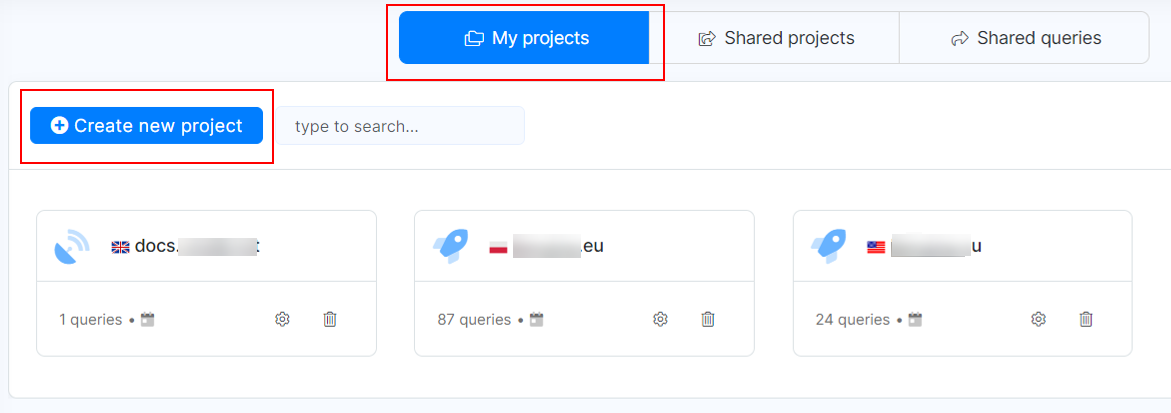
- Log In: Initiate by logging into your NeuronWriter account.
- My Projects: Click on My projects, then on Create new project.
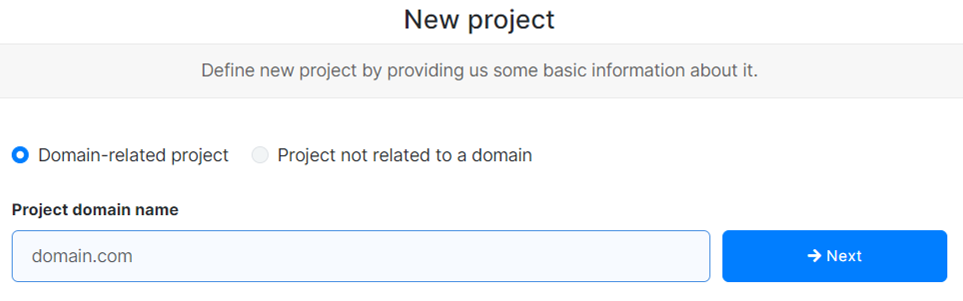
2. Set Up Your Project
Define your project by choosing a name.
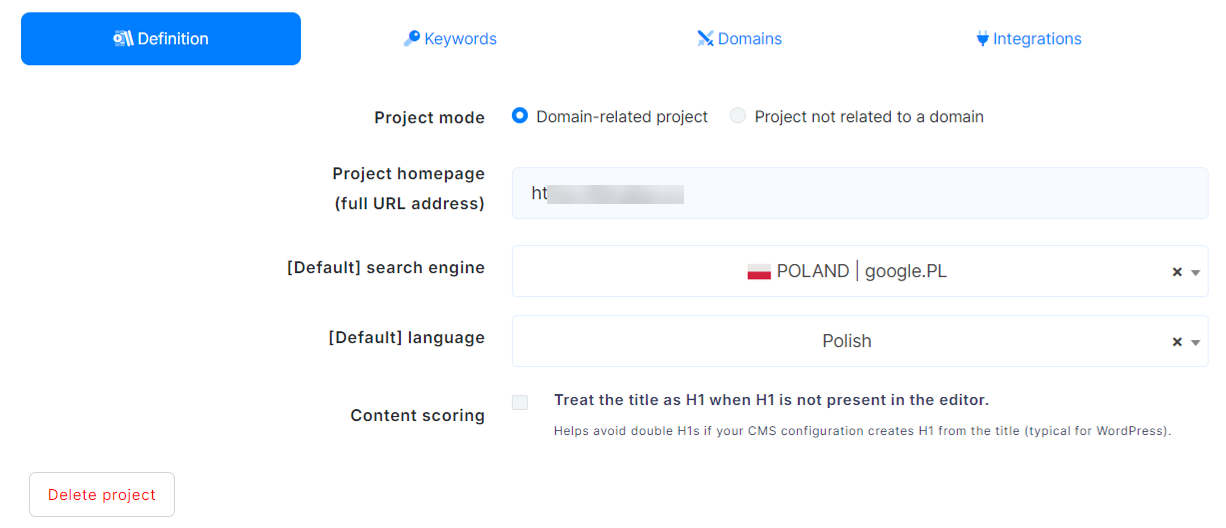
Then it will ask to provide basic information about the project:
Additionally, you can put your desired keywords, and competitors’ domains, and integrate with WordPress for better content optimization.
3. Set Up New Queries:
Once you set up the project, you can create new queries to optimize content by clicking on “New queries”. This will offer an interface with 2 new options.
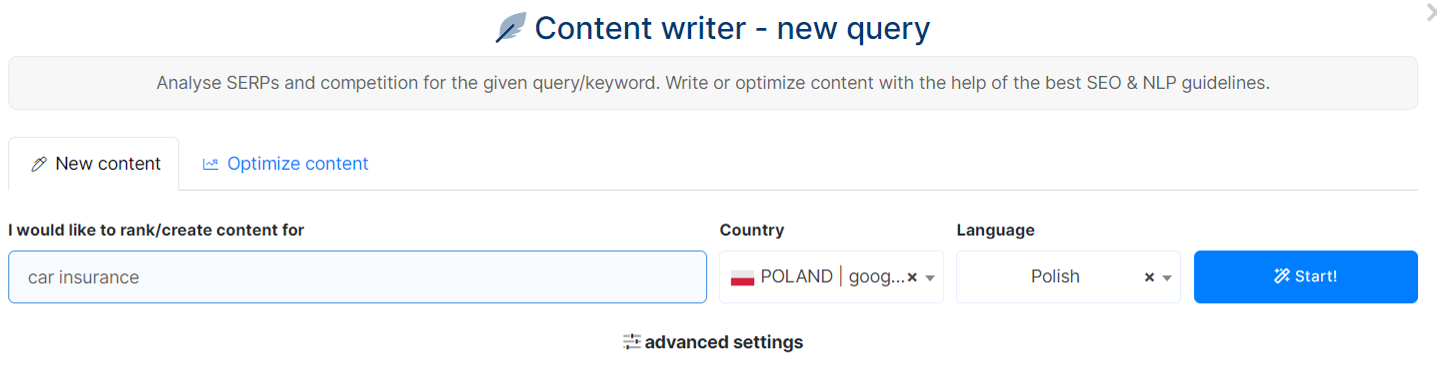
- “New content and
- Optimize content”.
For new content optimization, click on “New Content” and put your primary keywords. Next, choose the country in the language.
To optimize existing content, you have to click on “Optimize Content”, put your URL and the target keywords, then click on “Start”.
4. Content Planning
After putting your keywords, NeuronWriter conducts a deep review and displays the top 30 ranking pages.
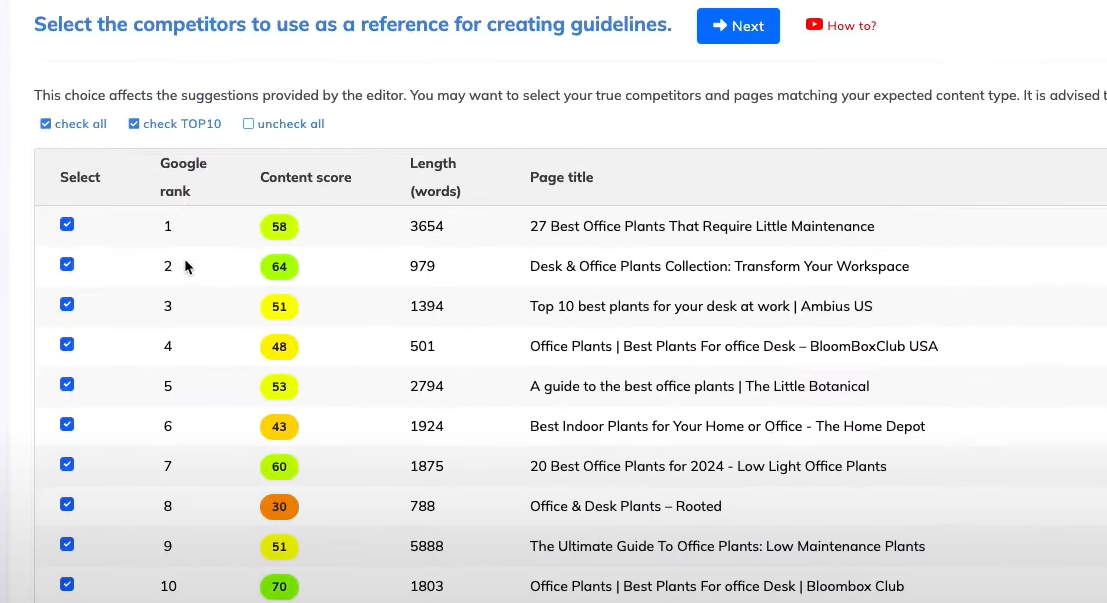
Now, based on the content relevancy and content score, you need to select the competitors for creating guidelines. However, it is recommended to choose the top 10 ranking pages.
5. Content Creation and Optimization:
After choosing your competitors, it will lead you to NeuronWriter’s editor dashboard. Here you can write and optimize your content.
A. Accessing the Content Editor
Its content editor enables you to efficiently write and structure your content.
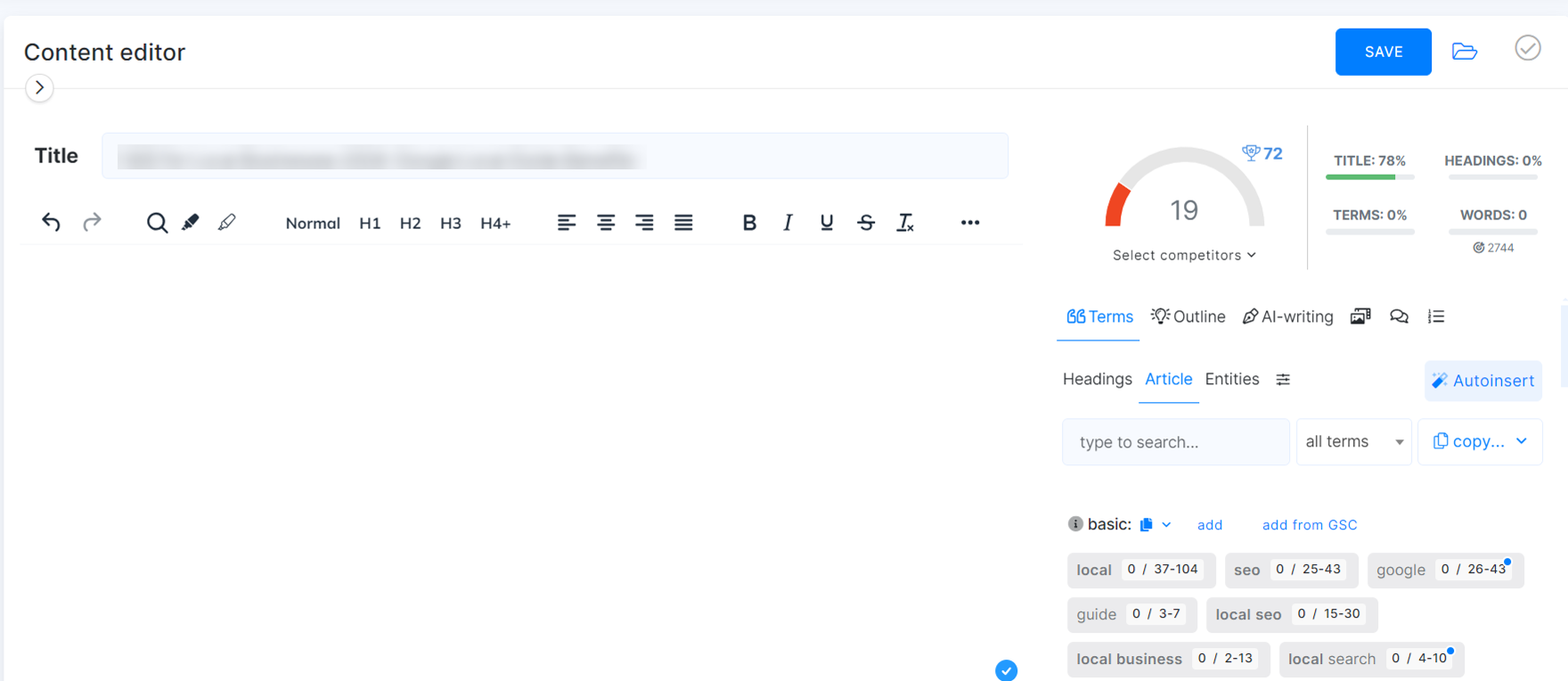
Also, you can add images, embed videos, create tables, and insert links.
B. Preparing Outline
On the right side, clicking on “Outline” will offer various heading ideas, including H1, H2, H3, and relevant queries, based on competitors’ analysis.
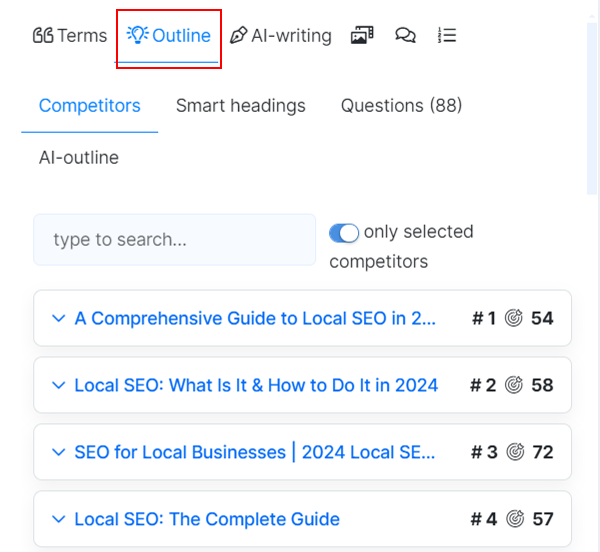
In fact, its AI-outline feature can generate an outline in a single click.
C. AI-Writing
AI-Writing feature generates unique titles, content ideas, introductions, FAQs, rephrases, and expands text.
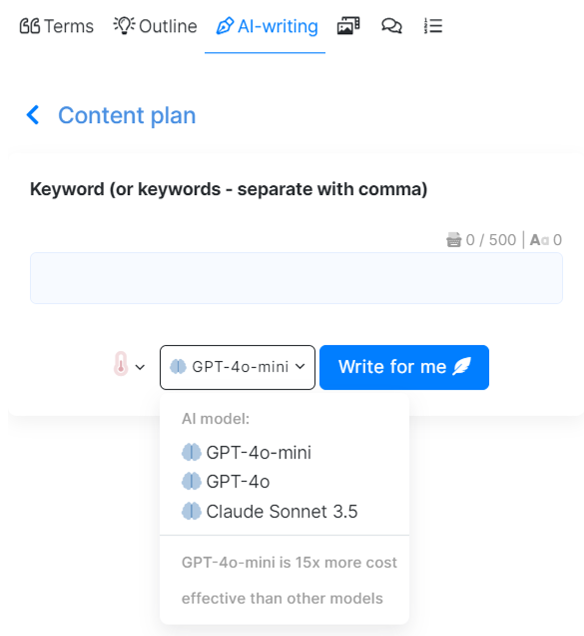
For that, you just have to input the keywords, choose any AI model then generate.
D. Content Optimization
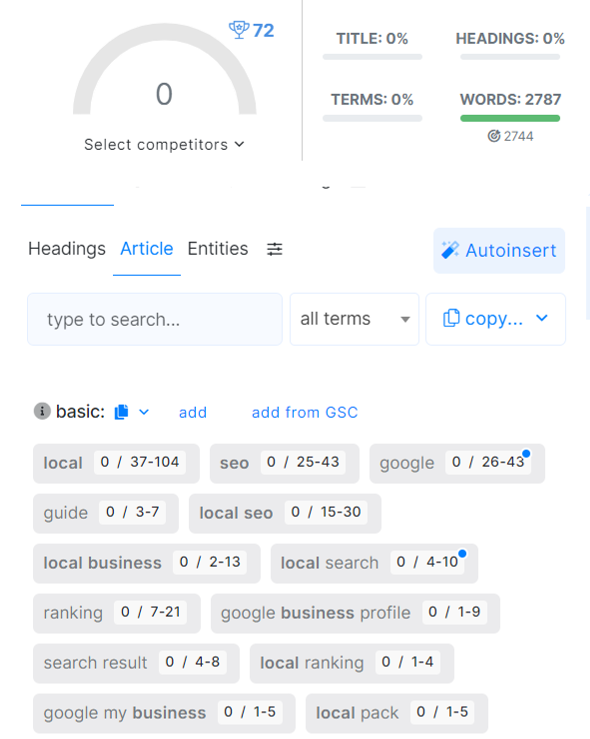
The right side of the editor indicates your SEO content score and suggests numerous keywords and terms to further optimize your content.
E. Review and Edit
This tool offers an inbuilt plagiarism checker system that ensures the originality of the content. You can also alter the tone of your content by following NeuronWriter feedback.
My Experience of Using NeuronWriter
With four years of experience as a WordPress blogger and content writer, I have long needed an AI-powered writing assistant tool to boost my productivity. After implementing NeuronWriter, that need has been fulfilled.
The most time-consuming part of blogging and content writing is researching and creating a comprehensive outline and guide, covering all the information about a specific topic. Furthermore, we can’t assess the quality of the content in terms of on-page SEO, comparing it with other top-ranking pages.
Therefore, I have come to this decision- NeuronWriter is an all-in-one writing tool that conducts research, prepares outlines, and suggests niche-specific keywords in a single dashboard. This maintains all the criteria of EEAT guidelines in your article, fully optimizing your content.
NeuronWriter: Pros & Cons
Let’s look at some of the positive and negative sides of this tool.
Pricing & Plans
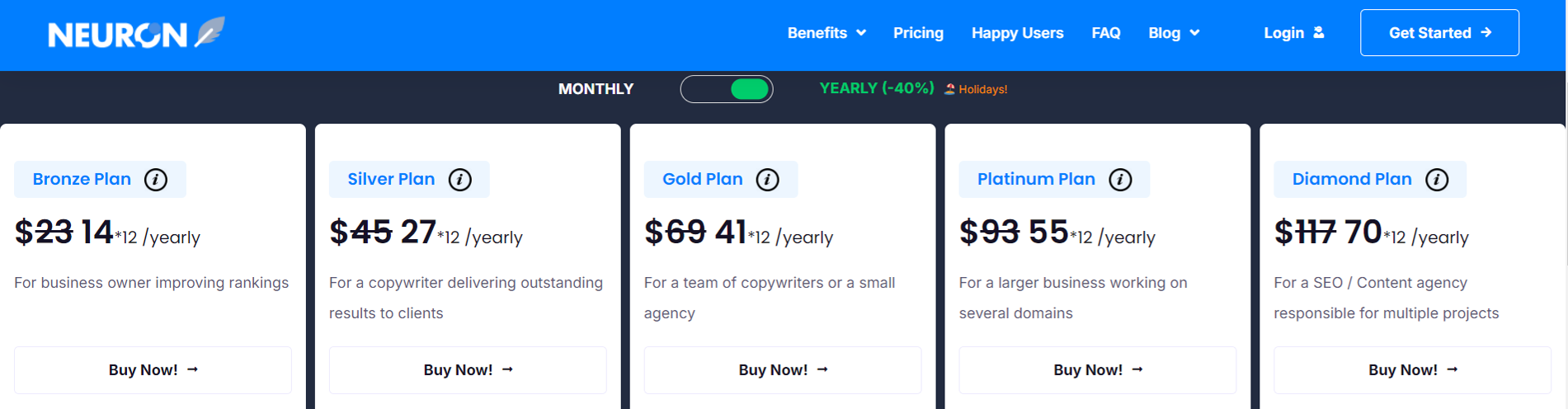
NeuronWriter offers monthly and yearly plans. Its yearly plans are 40% less compared to monthly plans. Let’s observe the prices.
Monthly Plans:

Yearly Plans:
NeuronWriter Lifetime Deal
NeuronWriter oftentimes releases lifetime deals (LTDs) via different platforms. This deal gives access to lifetime NeuronWriter through a one-time payment.
Benefits of NeuronWriter Lifetime Deal:
NeuronWriter AppSumo Deal
There is an amazing digital marketplace named AppSumo that promotes daily deals on numerous products, particularly on SaaS tools, e-books and courses.
However, AppSumo Deal has ended now. But, no worries. Keep an eye on their official website and grab the lifetime deal there.
NeuronWriter vs Competitors
Let me present a comparison to you of NeuronWriter with some other popular AI writing, SEO tools.
1. NeuronWriter vs Surfer SEO:
NeuronWriter is an AI-driven optimization tool built on GPT-4 Turbo that is focused on semantic analysis, improving your content relevancy based on the target keyword.
While, Surfer SEO is a real-time content editor with real-time feedback on various aspects, including keyword usage and content structure.
This tool evaluates over 500 web signals utilizes NLP and suggests recommendations on the basis of ranking pages and target keywords. The tool evaluates keyword density, content structure, and readability, following SEO best practices.
2. NeuronWriter vs Frase
NeuronWriter primarily works on optimizing your content through a deep analysis of the ranking pages, using AI-powered content research and creation features.
Whereas, Frase is an AI-powered, research and content creation tool mainly used for creating outlines, headings, FAQs, and summarizing content. The tool implements AI technology to identify content-gap, generate a specific portion of content, and produce SEO-friendly content.
In short, Frase is best for AI content creation and research, and NeuronWriter is for SEO-friendly content optimization.
3. NeuronWriter vs Jasper AI
NeuronWriter and Jasper AI are both AI writing tools that assist bloggers and marketers in producing quality and optimized content.
However, Jasper AI stands out as a versatile AI-writing tool that helps create creative marketing content. The tool is modified for agencies, marketing, teams, bloggers, and content writers.
Conclusion
NeuronWriter is an excellent tool equipped with AI technologies for producing SEO-optimized content. Its SERP analysis, keyword suggestions, and AI-writing always put myself forward in the competitive organic ranking domain. Therefore, NeuronWriter is highly recommended for bloggers, content markers, and SEOs.
Ready to boost your content optimization quality? Try NeuronWriter today and rank your article on the 1st page of the Google SERP.